The Hidden Cost of “Fast Response” in Service Businesses
Slow follow-up quietly drains bookings, reviews, and cash flow. Use a simple lead-decay model and channel benchmarks to find where workflow-automation pays off.
Fast response isn’t a virtue—it’s a revenue control

In most service-businesses, “we respond fast” is treated like a marketing claim. Operationally, it’s a profit lever. Every minute between a lead and your first helpful touch increases the odds they book with someone else, leave a lukewarm review about “no call back,” or go cold until you’re chasing them with discounts. The hidden cost shows up as scattered pipeline notes, missed callbacks, and admin work that steals time from jobs you can actually bill for.
The kicker: owners usually feel the pain but can’t quantify it. That’s why operations teams win—because measurement makes tradeoffs obvious. If you can estimate lead volume, average job value, and close rate by channel, you can put a dollar figure on response time. Once you can price delay, decisions about workflow-automation (and how to implement it without wrecking customer-experience) get much easier.
This is also why “fast response” can be expensive when done manually: the owner becomes the bottleneck. Speed requires systems, not heroics.
A simple model to quantify lead decay (and why channels differ)
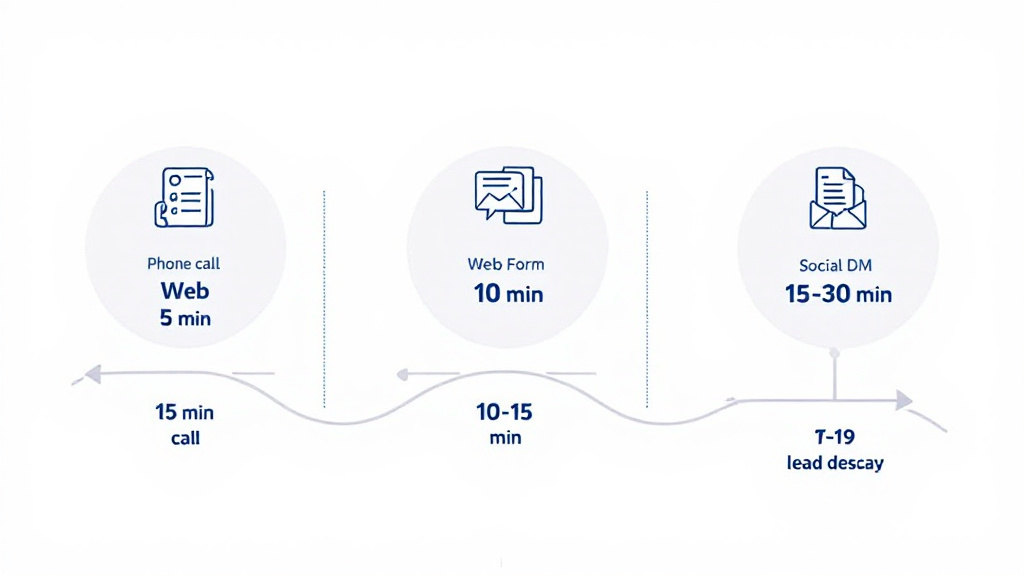
To model lead decay, start simple: Leads × Qualification rate × Close rate × Avg. job value = expected revenue. Now apply a response-time penalty. For example, if your baseline close rate is 30% with a 5-minute response, but it drops to 20% at 60 minutes, that gap is your “delay tax.” With 40 leads/day, a 10-point drop equals 4 lost jobs per day. Multiply by your average job value and you’ll quickly see why lead-response isn’t an admin detail—it’s a financial one.
Response-time thresholds vary by channel because expectations differ. As a rule of thumb: missed calls need a call/text back within 5 minutes; web forms within 10–15 minutes; and DMs (Facebook/Instagram/Google Business Messages) within 15–30 minutes. Past those windows, prospects often keep shopping.
Track this in one weekly dashboard: median first-response time by channel, contact rate, booked rate, and “lost-to-no-contact.” That’s practical operations you can act on.
Where automation helps—without creating customer-hostile experiences

The best workflow-automation doesn’t “robotify” your business; it removes dead time while preserving trust. A strong pattern is: capture the lead, confirm receipt instantly, ask one qualifying question, and route the next step. For a service-business, that might mean: missed call triggers an immediate text (“Got your request—what’s the address?”), a drafted email reply for review, a tentative booking link if qualified, and a CRM record created automatically. Edge cases (urgent, high-value, angry, unclear) get a human handoff.
Guardrails prevent customer-hostile moments. Use plain language, avoid fake personalization, and make it easy to reach a person (“Reply HUMAN anytime”). Keep AI-assisted triage behind the scenes: draft responses, summarize threads, and flag intent—not auto-send risky messages. Also monitor failures: bounced emails, calendar conflicts, duplicate contacts, and “prompt drift.” Reliability is part of customer-experience, not just tech.
This is the core of productized automation-and-ops: ROI-scoped builds, then monthly maintenance. OpsFlow Partners exists to make that repeatable, measurable, and calm.